Make everything you have recorded useful again.
Search across meeting recordings and ask questions with cited sources. Use VoxStudio knowledge in the app, ChatGPT or Claude through Mac and Cloud MCP.
For researchers, interviewers and teams whose answers are spread across multiple meetings, interviews and videos.
Download for Mac · Compare plans & trial
Apple silicon · macOS 15 or later · 14-day Mac trial
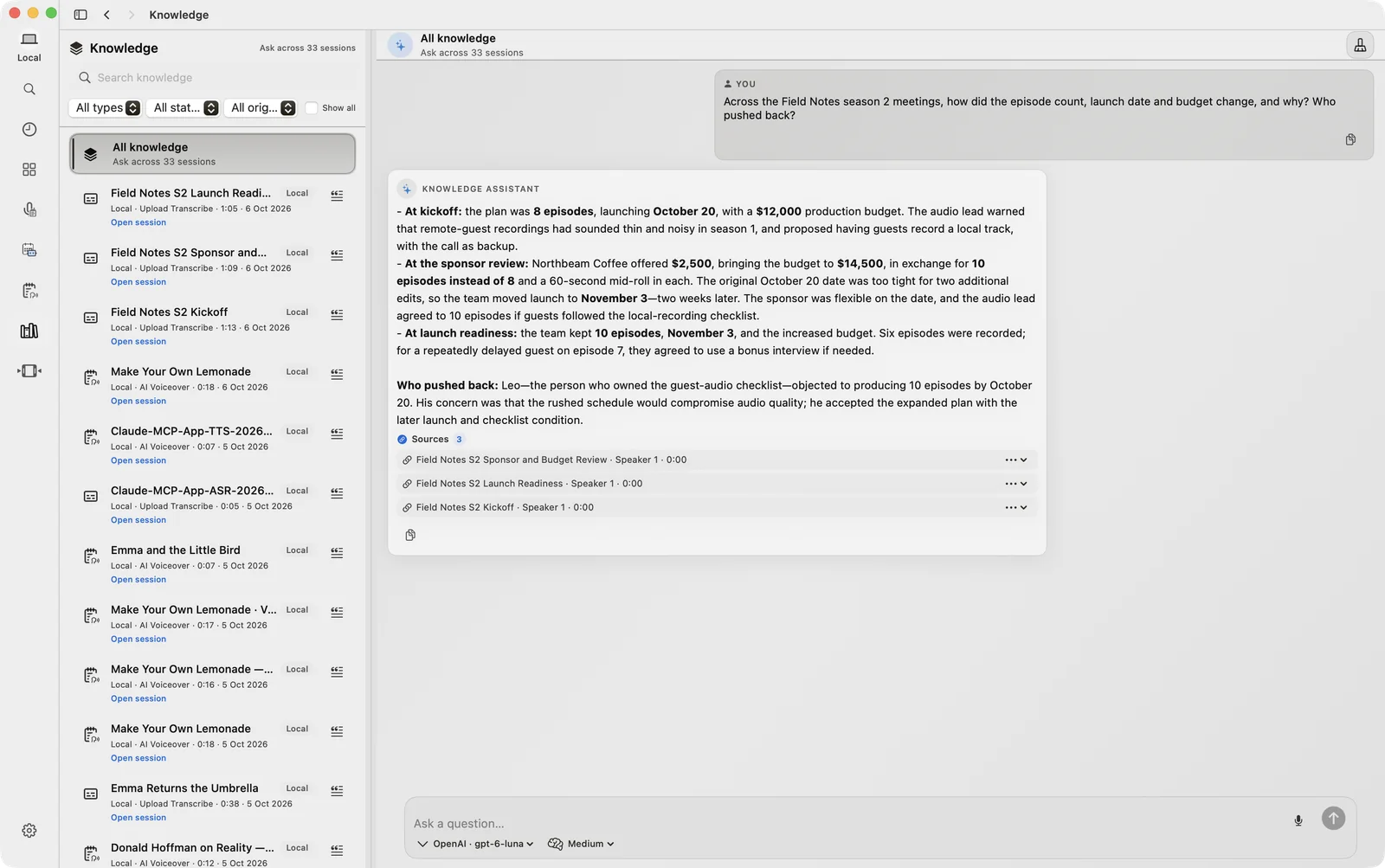
One question, across your recording library
Turn transcribed meetings, interviews and videos into a knowledge base. Search by meaning, ask across sessions or focus on one recording, and compare decisions, deadlines and recurring questions.
Check the original words
Answers link to the sources they used. Open a cited session to read the original passage with its speaker and timestamp, then play the recording to check the context before acting on an answer.
Use your library from ChatGPT and Claude
MCP connects VoxStudio knowledge to supported clients such as ChatGPT, Claude and Cursor. The Mac MCP server exposes your local library to clients on the same Mac. Cloud MCP uses OAuth to connect your cloud sessions without requiring the Mac app to stay open.
Local search and AI answers have different boundaries
Indexing and search in VoxStudio for Mac run on your Mac. AI answers use the service you select, such as VoxStudio Cloud or your own API provider. An external MCP client receives the evidence needed for its request, so local storage does not mean every AI interaction is offline.
Questions, answered
Can I ask a question across several meetings?
Yes. Ask across your knowledge library or narrow the question to one session. Source links let you inspect the transcript passages behind the answer.
What is the difference between Mac MCP and Cloud MCP?
Mac MCP serves your local library to supported clients on the same Mac. Cloud MCP provides access to your cloud sessions through an OAuth connection. Your chosen assistant processes the evidence returned for its request.
Follow the guides
- Ask Your Recordings a Question. Check the Source. — Stop replaying a whole recording for one detail. Ask a question, read the cited answer and keep the original transcript close in VoxStudio, ChatGPT or Claude.
- One Recording. More Ways to Use It on Mac. — Capture a conversation, ask about the transcript and turn the useful part into a video. Keep the work connected in VoxStudio for Mac.
- Live Transcription on Mac: Stay in the Conversation — Follow the words as they arrive. Jot a keyword, keep listening and return to notes with source timestamps in VoxStudio for Mac.
Blog topics
More Mac workflows
- Offline Transcription for Mac
Transcribe audio and video on your Mac with local speech models, speaker labels and timed captions. Built for Apple silicon and macOS 15 or later.
- Meeting Recorder for Mac, Without a Bot
Record meetings locally on your Mac without a bot joining the call. Transcribe recordings, follow live speech and review notes in VoxStudio.