Blog · Meetings
Record Zoom Meetings on Your Mac Without a Bot Joining the Call
VoxStudio for Mac detects an open meeting app like Zoom and records it locally in one click: no notetaker in the participant list, no admit request, the file saved on your Mac. Here is when to use it, and when the web Meet Bot is the better fit.
By David, Product Specialist at VoxStudio · · 6 min read
Key takeaways
- VoxStudio for Mac notices that a meeting app such as Zoom is open and puts a Record this app button next to it. One click starts recording.
- Nothing joins the call: no "Notetaker has joined", no waiting-room request, no extra tile. The recording happens on your Mac and is saved there.
- App audio and your microphone are captured together, so both sides of the conversation end up in one file, ready to transcribe.
- Need a recorder when you cannot be there, or for Google Meet and Teams from the browser? The VoxStudio web Meet Bot joins as a visible participant instead.
A Tuesday with five calls and no time for notes
Maya runs client accounts at a small agency. Tuesday is five Zoom calls back to back: a kickoff with a new client, a check-in with a long-time customer, two vendor calls and a 1:1. Every call ends with promises — a date, a budget, "we will send the brief by Friday" — and she has about four minutes between calls to write them down.
A cloud notetaker would help, but it comes with friction. The new client's IT team does not admit unknown bots. The long-time customer asked last month why "Notetaker" was sitting in the call. And for a 1:1, a bot tile in the corner changes the tone of the conversation.
What Maya wants is the opposite of a bot: something that records from her own Mac, does not show up in anyone's participant list, and starts with one click while she is already saying hello.
Record the meeting locally, in one click
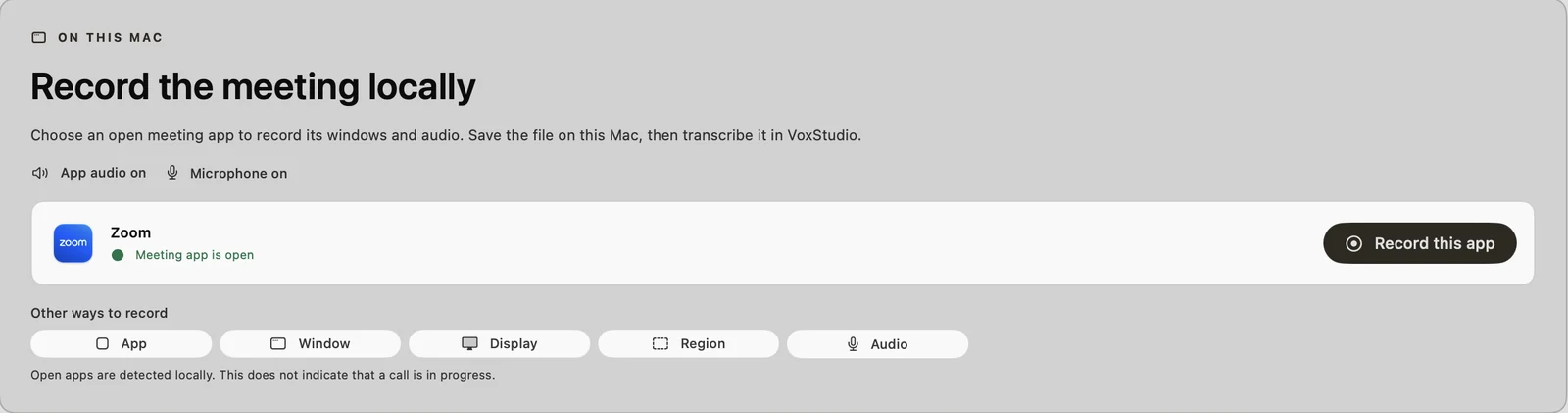
Open Zoom as usual. VoxStudio does the rest from the Meeting Recorder page.
On this Mac: Record the meeting app, not a bot
VoxStudio sees which meeting apps are open and records the one you choose, including its windows, its audio and your microphone.
Best for: Client calls, interviews, 1:1s and any meeting where a bot would be blocked or unwelcome. Result: A recording of the meeting saved on your Mac, ready to trim and transcribe.
Open Meeting Recorder
Choose Meeting Recorder in the VoxStudio sidebar. The page has two options: the Meet Bot at the top, and Record the meeting locally under On this Mac.
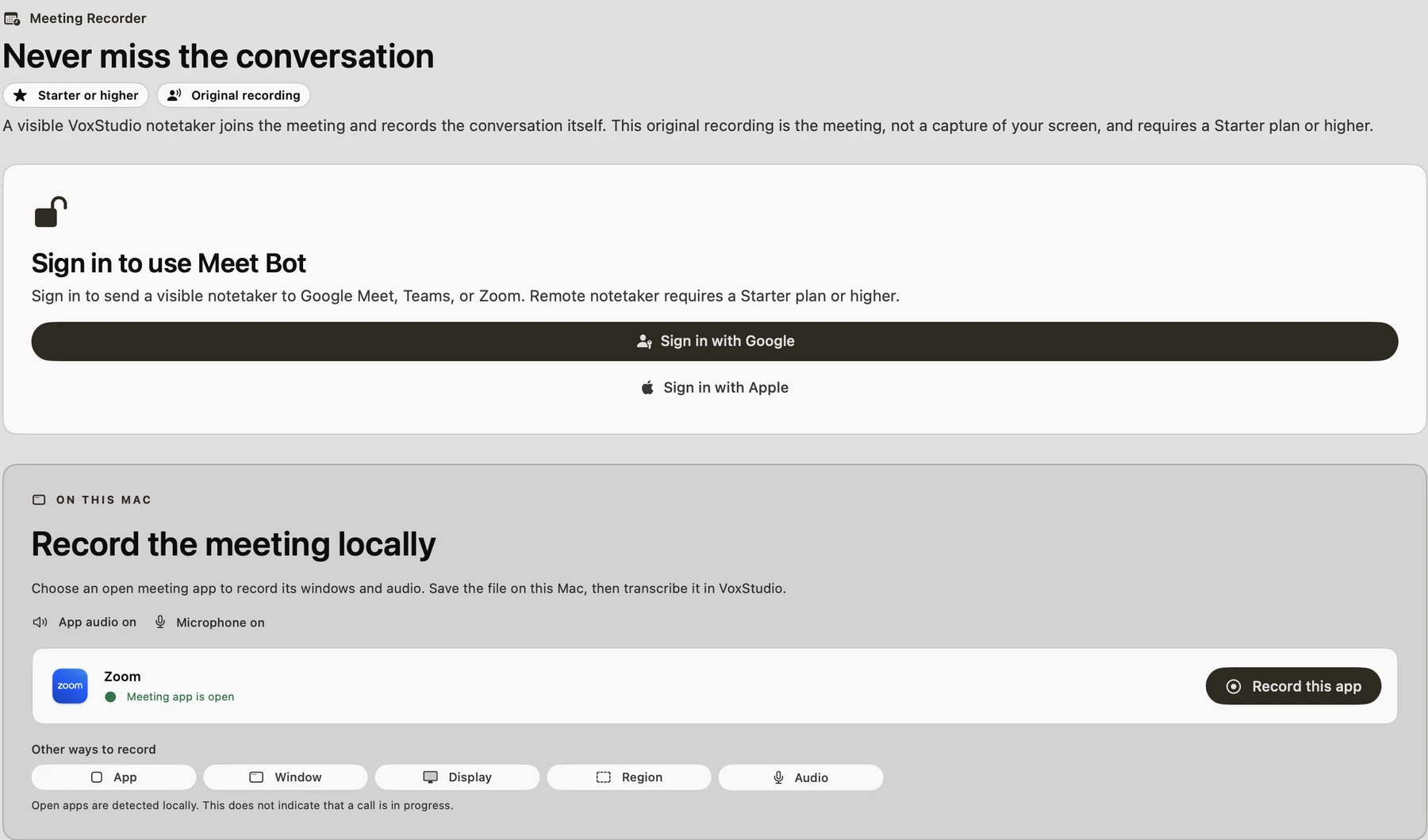
Two ways to record a meeting, side by side. Zoom is already there
Open meeting apps are detected on your Mac and listed with a green "Meeting app is open". App audio and Microphone are both on, so you are recorded together with everyone else. If a meeting app is not listed, use Other ways to record: App, Window, Display, Region or Audio.
Detected locally. It only means the app is open, not that a call is in progress. Click Record this app
That is the whole setup. VoxStudio switches to App capture for Zoom with your microphone and Zoom's audio, and starts recording. The main window gets out of the way so your call stays front and centre.
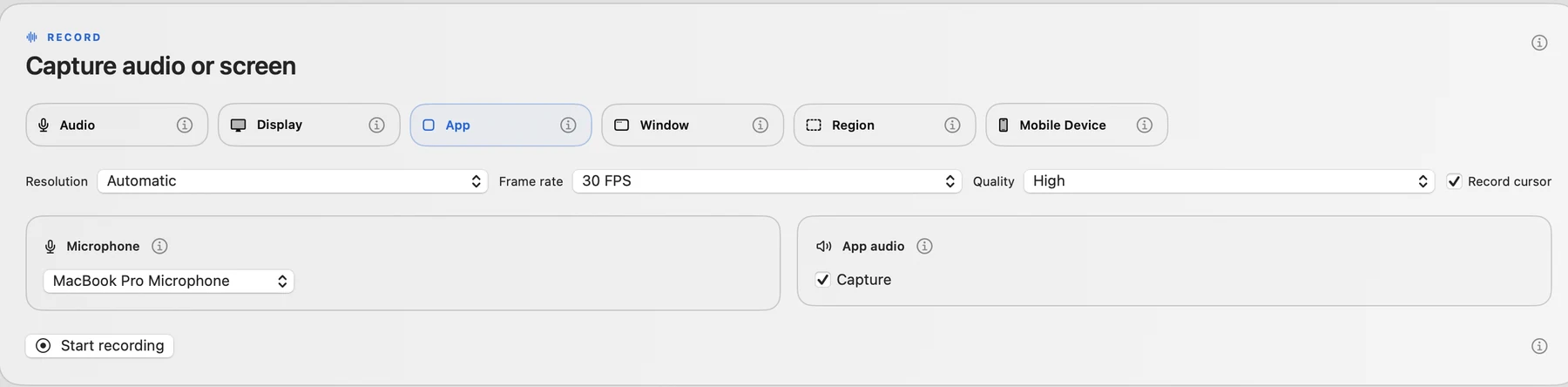
One click fills in App mode, microphone and app audio for you. Forget about it — check the menu bar if you need to
A small VoxStudio icon with a running timer sits in the menu bar. Click it to stop, pause, mute your microphone, show the recording controls or discard the recording. Nobody else on the call sees any of it.

All the controls live in the menu bar, out of the call. Stop, trim and transcribe
When the call ends, choose Stop Recording. The recording opens in a preview where you can trim the small talk at the start and the goodbyes at the end, then continue to Processing options and click Transcribe. If you close the preview, the file is still saved on your Mac.
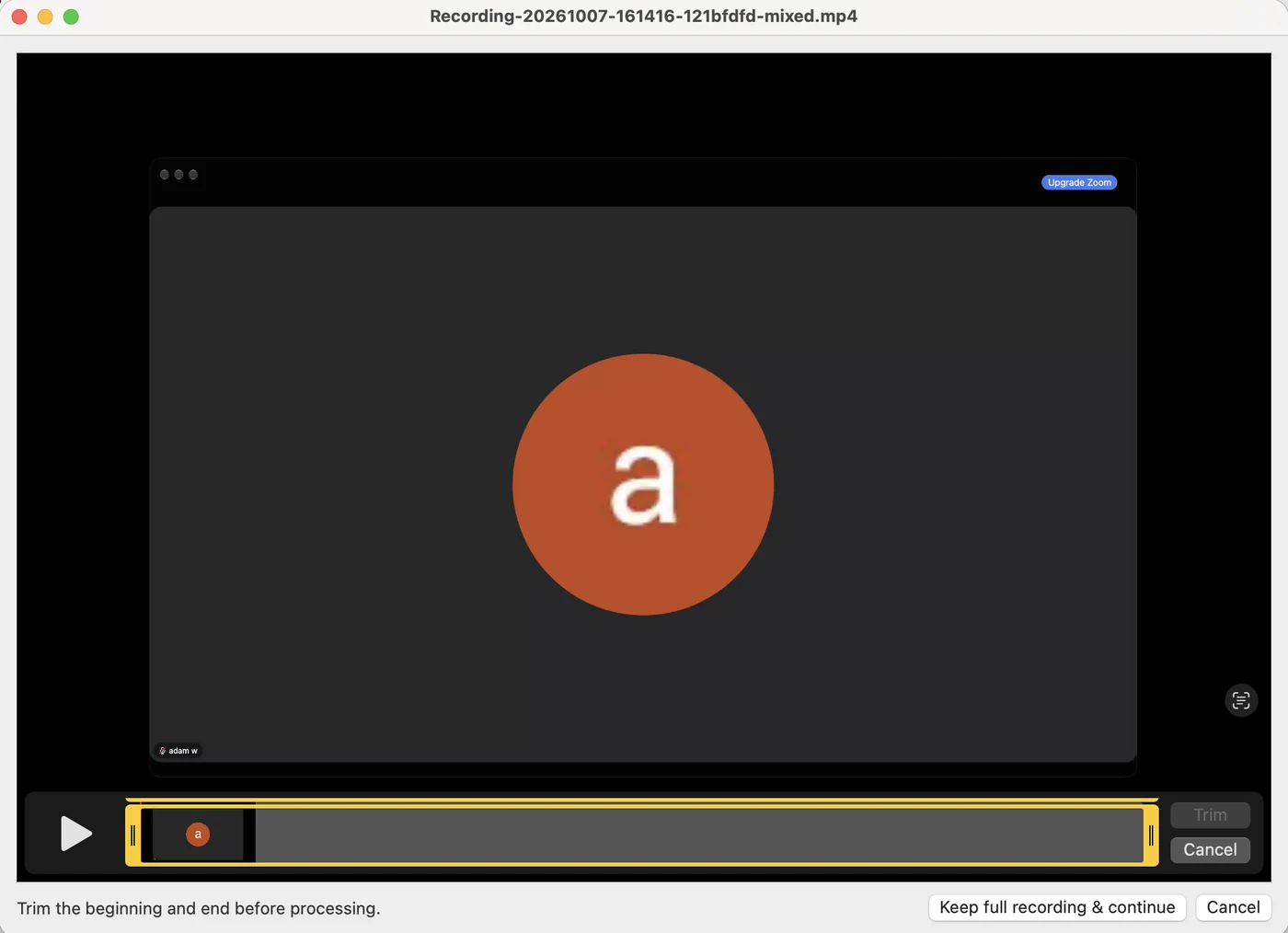
The recording is the meeting app itself, with its audio and your microphone mixed together.

Local recording or Meet Bot?
| On this Mac (local) | Meet Bot (VoxStudio web) | |
|---|---|---|
| How it records | Records the meeting app on your Mac | A visible VoxStudio notetaker joins the call |
| Shows up in the call | No | Yes, as a participant |
| Needs to be admitted | No | Yes, if the meeting uses a waiting room |
| You need to be there | Yes, on this Mac | No, it can attend for you |
| Where the file lives | On your Mac | In your VoxStudio Cloud account |
| Plan | VoxStudio for Mac | Starter plan or higher |
Tips for clean meeting recordings
- Still tell people — Not having a bot in the call does not replace consent. Say "I am recording this for my notes" at the start, and follow your company policy and local law.
- Keep your microphone on — App audio is everyone else; your own voice comes from the microphone. Leave Microphone on so the transcript has both sides.
- Mute without stopping — Need a private aside? Use Mute Microphone in the menu bar, then unmute. The recording keeps running.
- Name it after the client — Title the session "Acme kickoff — 7 Oct" when you transcribe. It becomes easy to find, and the knowledge assistant can cite it later.
FAQ
Can I record a Zoom meeting on Mac without a bot joining?
Yes. In VoxStudio for Mac, open Meeting Recorder. Under Record the meeting locally, Zoom appears when it is open; click Record this app. VoxStudio records Zoom and your microphone on your Mac, and nothing joins the call.
Do other participants see that I am recording with VoxStudio?
VoxStudio does not join the meeting or add a participant, so it does not appear in the call. You should still let people know you are recording and follow your local laws and company policy.
Does it record my own voice?
Yes, with Microphone on. App audio captures the meeting app, and the microphone captures you; both are mixed into one recording.
How do I stop or pause the recording?
Click the VoxStudio timer in the menu bar and choose Stop Recording or Pause Recording. You can also mute your microphone or discard the recording there.
When should I use the Meet Bot instead?
Use the VoxStudio web Meet Bot when you cannot attend, or want the recording in VoxStudio Cloud. It joins Google Meet, Teams or Zoom as a visible notetaker and requires a Starter plan or higher.
Record your next call without inviting a bot
VoxStudio for Mac records meeting apps locally, then transcribes and summarizes them in the same app. Download VoxStudio for Mac
David — David works on the VoxStudio product team and spends most days inside the video editor, turning real customer workflows into faster ones.