How to Preview SRT or VTT Subtitles with an MP4 Online
Import your subtitle file onto a video track and check the words against the picture. Try the two-cue sample in the browser before rendering.
By VoxStudio Team, Product team · · 3 min read
Key takeaways
- Use a video that your browser can play and a timed SRT or VTT file.
- Select the video track before choosing Import subtitles.
- Local preview is free without an account. Web rendering uploads media and requires sign-in and an eligible plan.
Try two subtitle cues
- Open the online video editor
- View the first cue in the web editor
Reference screenshot for checking the first subtitle.
- Download the sample SRT
Use a video at least five seconds long. The first caption starts at half a second and the second at two and a half seconds.
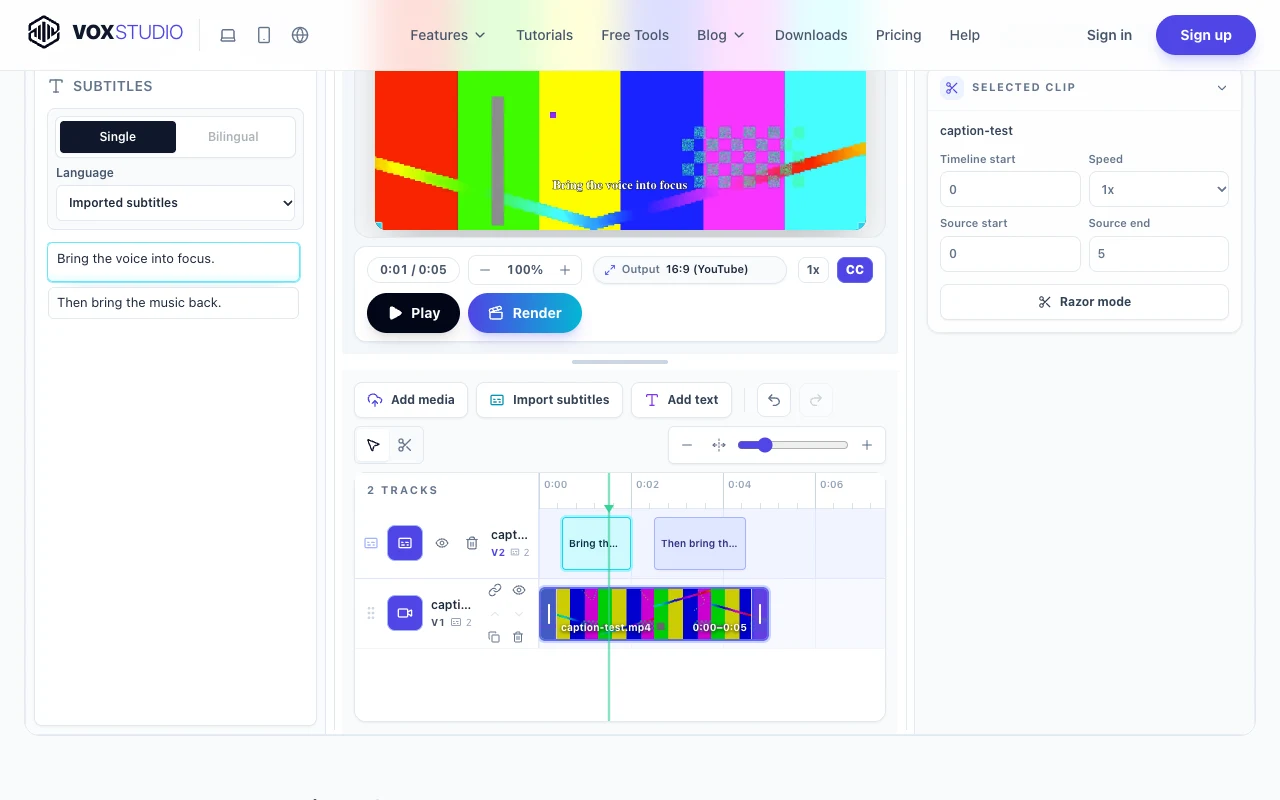
Add the video and select its track
Add your MP4 to the timeline and place it at the start. Select its video track, choose Import subtitles and open the sample SRT or your own SRT or VTT file. If the import control is disabled, select a video or audio track first.
Check the sample against the preview
| Playhead | Expected subtitle |
|---|---|
| 1 second | Bring the voice into focus. |
| 2.25 seconds | The gap between cues should be clear. |
| 3 seconds | Then bring the music back. |
Play through both cue boundaries. With your own footage, listen for the first spoken word and check when its caption appears. If you switch to a vertical or square frame, preview the longest line again to check the edges.
Render a captioned video
You can finish checking subtitle timing in the free local preview. To create the finished video on the web, sign in with a plan that includes video rendering. The render uploads your media for processing.
FAQ
Do I need a transcript or an account to preview my SRT?
A timed subtitle file and a compatible local video are enough to preview the captions without signing in.
Why does the sample caption disappear just after two seconds?
The first cue ends at 2.000 seconds. The next starts at 2.500 seconds, leaving a half-second gap.
Explore the Mac workflows
Preview your subtitles
Bring your video and subtitle file into the browser editor. Open the video editor · Compare plans & trial
VoxStudio Team — We build VoxStudio. This guide records our own tests, their limits and the files needed to reproduce them.